
Optimize Website Load Speed Tips: Boost Performance Fast
Feeling frustrated with slow-loading websites? You’re not alone.
In a world where instant gratification is the norm, even a few extra seconds of waiting can send visitors clicking away. Your website’s load speed isn’t just a technical detail; it’s a crucial element that can make or break your online presence.
Imagine the potential customers you’re losing just because your site doesn’t load fast enough! The good news? Optimizing your website’s load speed doesn’t have to be a daunting task. In this guide, you’ll discover simple and effective tips that you can implement right away. Get ready to transform your site into a lightning-fast experience that keeps your visitors engaged and coming back for more. Stay with us, and let’s boost your website’s performance together.

Importance Of Website Speed
Fast websites make people happy. They don’t like waiting long. Slow websites can make them leave quickly. This means fewer visitors. Fewer visitors mean less success for your site. Search engines like fast websites too. They rank them higher in search results. This helps more people find your site.
Slow loading can also hurt your business. Customers may not buy if they wait too long. This can mean lost sales. Speed matters for everyone online. It’s important for a good user experience. People want information fast. They want it now.
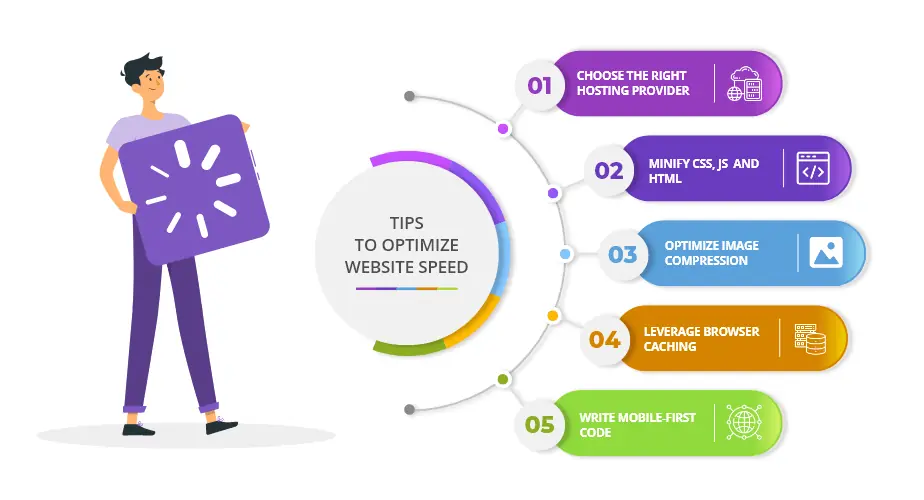
Image Optimization Techniques
Enhancing website load speed involves optimizing images efficiently. Compress image files to reduce size without losing quality. Choose the right format, like JPEG or PNG, depending on the image type. Use descriptive alt text to improve accessibility and SEO. Implement lazy loading to ensure images load as users scroll.
Compress And Resize Images
Large images slow down websites. Compressing images makes them smaller. Use tools like TinyPNG or JPEG Optimizer. Resize images to fit your web page. No need for big images if small ones work.
Use Next-gen Formats
New formats like WebP load faster. They are smaller than JPEGs and PNGs. WebP works with most browsers. Convert your images to WebP for better speed.
Implement Lazy Loading
Lazy loading means images load only when needed. It saves bandwidth and speeds up your site. Use lazy loading plugins or code. It helps the first part of your page load quickly.
Minimize Http Requests
Combining files can reduce the number of HTTP requests. Fewer requests mean faster load times. JavaScript and CSS files are often combined. This helps make websites load quickly.
CSS sprites are images put together in a single file. They reduce HTTP requests. This makes pages load faster. Use them for icons and small graphics. They help speed up websites efficiently.
Redirects slow down page loading. Each redirect takes time. Removing unnecessary redirects helps speed up loading. Direct links are better. They make websites load quickly and efficiently.
Browser Caching Strategies
Browser caching makes websites load faster. It saves copies of files. So, setting expiration dates is key. These dates tell browsers how long to keep files. Choose long dates for files that change rarely. For example, images or stylesheets. Short dates work for files that change often. Like scripts or data files.
Cache control headers tell browsers how to store files. They help manage what to cache and for how long. Use them to set rules for different file types. This ensures users see the latest content. It also helps reduce server load. Remember, balance is important. Too much caching can show old content. Not enough can slow down your site.
Content Delivery Network (cdn) Usage
Picking the best CDN is very important. It helps in speeding up website load times. Look for CDNs with good coverage. They should have servers in many places. This makes sure users get data quickly. Check the CDN’s reviews. See if other users are happy. Look for a CDN that is easy to set up. Some CDNs offer extra tools. These tools can help optimize performance. Picking a good CDN can help your website run smoothly.
CDNs store content on many servers. These servers are in different countries. This helps reduce load time. Users get content from the server closest to them. This makes pages load faster. It also improves user experience. Global distribution is key for websites with international visitors. Choose a CDN that supports global reach. This helps your website work well for everyone.
Reduce Server Response Time
Speeding up your website load time starts with reducing server response time. Faster servers mean quicker page loads. Improve server performance to enhance user experience.
Optimize Database Queries
Slow database queries can make your website lag. Check your database for slow queries. Fix or remove these queries. Use indexes to speed up searches. Limit the data you fetch. Fetching less data means faster speeds. Avoid complex joins. Simple queries run faster.
Upgrade Hosting Plan
If your site loads slowly, your hosting plan might be weak. Better plans offer faster speeds. Shared hosting is often slow. Dedicated hosting or VPS can be faster. These plans offer more resources. More resources mean faster speeds. Consider upgrading if your site is slow. Better hosting can help a lot.
Enable Compression
Implement Gzip Compressionto make websites load faster. Gzip reduces file sizes. This helps pages load quickly. Smaller files use less bandwidth. Browsers can download them faster. Enabling Gzip on your server is simple. Most web hosts support it. Check your server settings. Ensure Gzip is active. This boosts speed.
Optimize HTML, CSS, and JavaScriptfor a faster site. Remove unnecessary spaces and comments. This reduces file size. Smaller files load quicker. Minify these files to improve speed. Minification removes unwanted bits. Use tools like Minify or Uglify. They automate the process. Optimized code makes browsing smooth. Users enjoy faster sites.

Reduce Css And Javascript
Minifying code helps your site load faster. It removes spaces, new lines, and comments. This makes the file size smaller. Smaller files mean quicker load times. Tools like CSSNano and UglifyJS can help with this. They make code easier to handle.
Unused code slows down your website. It takes up space. Identify and remove this code. This will improve speed. Tools like PurifyCSS can help. They find unused CSS. JavaScript can also have unused parts. Clean them up to boost performance.
Mobile Optimization Tactics
Boost website speed by compressing images and minifying code. Use caching to reduce server load and improve responsiveness. Optimize for mobile by prioritizing fast loading times, ensuring users get a smooth experience on any device.
Responsive Design
Responsive design makes websites look good on all devices. It adjusts the layout to fit screens of different sizes. This helps users read and browse easily. A site that is not responsive may look messy on mobile. This can make users leave the site. A responsive website improves the user experience. It also makes the site more attractive to visitors. Search engines prefer responsive sites. This can help your site rank better.
Accelerated Mobile Pages (amp)
Accelerated Mobile Pages, or AMP, make pages load faster on mobile. They strip down the code to speed up loading time. This makes the content show up quickly on phones and tablets. Fast loading helps keep users on your site. Slow pages make users leave before they see your content. AMP can help improve your site’s performance. This can lead to more visitors and better engagement.
Monitor And Analyze Performance
Use tools like Google PageSpeed Insightsto see your website’s speed. These tools show you what is slowing down your site. You can make changes to improve. Fast websites make visitors happy. They stay longer and look at more pages.
Check your website’s load time often. This helps you find problems quickly. A slow site can push visitors away. Fast load times keep them interested. You can use a stopwatch or online tools. These help you see how fast your site is. Keep a recordof your results. This shows if your site is getting better or worse.
Frequently Asked Questions
How Can I Reduce Website Load Time?
Reducing website load time involves optimizing images, enabling browser caching, and minimizing HTTP requests. Compressing files and using a Content Delivery Network (CDN) can also enhance speed. Regularly auditing your website for unnecessary scripts and plugins helps maintain optimal performance.
What Tools Improve Website Speed?
Tools like Google PageSpeed Insights and GTmetrix analyze your site’s speed. They provide actionable insights to enhance performance. Using caching plugins and image optimization tools can further refine load speeds. Regular testing ensures your site remains fast and efficient.
Why Is Website Speed Important For Seo?
Website speed is crucial for SEO because it impacts user experience and search rankings. Fast-loading sites reduce bounce rates, increasing visitor engagement. Google prioritizes speedy websites in search results, improving visibility. Optimizing load time can significantly boost your site’s overall performance.
How Do Images Affect Website Speed?
Large images slow down website loading times. Optimizing images involves compressing them without losing quality. This reduces file sizes, enhancing speed. Using the correct file format and responsive images ensures efficiency. Regularly auditing your site’s images helps maintain optimal load speeds.
Conclusion
Optimizing website load speed boosts user experience and search rankings. Quick-loading pages keep visitors engaged. Implement caching and compress images for faster loading. Minimize redirects and use a content delivery network (CDN). These steps enhance performance and satisfaction. Regularly monitor your site’s speed to ensure efficiency.
Faster sites improve conversion rates and reduce bounce rates. Keep your website lean and user-friendly. Remember, every second counts in retaining visitors. Investing in speed improvements benefits your site’s success. Aim for speed and reliability to stay ahead. A faster website is a stronger website.
Read More:
- Ergonomic Home Office Setup Tips: Boost Comfort & Productivity
- Consumer IoT Market Forecast 2025: Trends & Insights
- Password Manager Comparison Guide: Choose the Best Tool
- Optimize Photoshop for Faster Editing: Speed Up Workflow
- Enterprise VR Training Solutions: Revolutionizing Workforce Skills
- Best VPN for Remote Work Security: Protect Your Data
- How to Set Up a Smart Home Hub: Ultimate Guide
- Vr Fitness App Trends 2025: Revolutionizing Workouts

